I’ve operated HF from the back yard shed before. See, in here, where all the computer screens and radio gear are, is an office chair… because it’s my office. In the pre-COVID days, when I drove 29 miles to Eagan most weekdays, it wouldn’t bother me to sit in my home-office chair at my home-office keyboard and do a bit of #HamRadio stuff evenings and off-days. But now that this is my day office, I kinda don’t want to sit in here when I ain’t workin’.
So yeah, of course when I first got my 2nd HF rig (an FT-991A), I set it up in the back yard shed by my La-Z-Boy. But I didn’t keep it there long, because I also smoke a pipe out there (and not in the house). The 991 now resides on the dash of the truck most of the time.
My 2nd way of operating HF from the smoke shack was to use #TeamViewer on my iPad to remotely connect to the Xubuntu desktop (runs on old Mac Mini). I can zoom in on the corner of the screen where flrig is running, and change bands, change freq, enable VOX, etc. The RX audio was sent via a musician’s in-ear monitor system over UHF. The TX audio was crossband in the following way… FT5D HT sent 70cm or 2m in to the FT991A, the speaker output of which connected to the Line In of the FTdx-3000, hence the need to enable VOX via flrig. This technically worked, but the in-ear monitor thing suffered challenges. I was really stretching it a further distance than it was designed for, given it does not have a little directional yagi antenna like the real pro ones do. Just an omni rubber duckie on the transmitting unit, and a loose wire hanging from the RX pak. So if there’s hiss and dropouts, it’s difficult to tell if the RX problem is HF or UHF.
I’m now on my 3rd method for operating phone modes from out in the smoke shack, which I very rarely do. I don’t care much for phone modes. I’m more often doing FT8, JS8, or one of the many modes that #fldigi does (and of those, CW is the most common that I use). All these modes do the transmit side by me tapping on a button, and maybe typing on the iPad keyboard (which I rarely do). But for AM or SSB, I needed a better, cleaner way to get the HF audio out to me. Enter, the flrig Web Remote app.
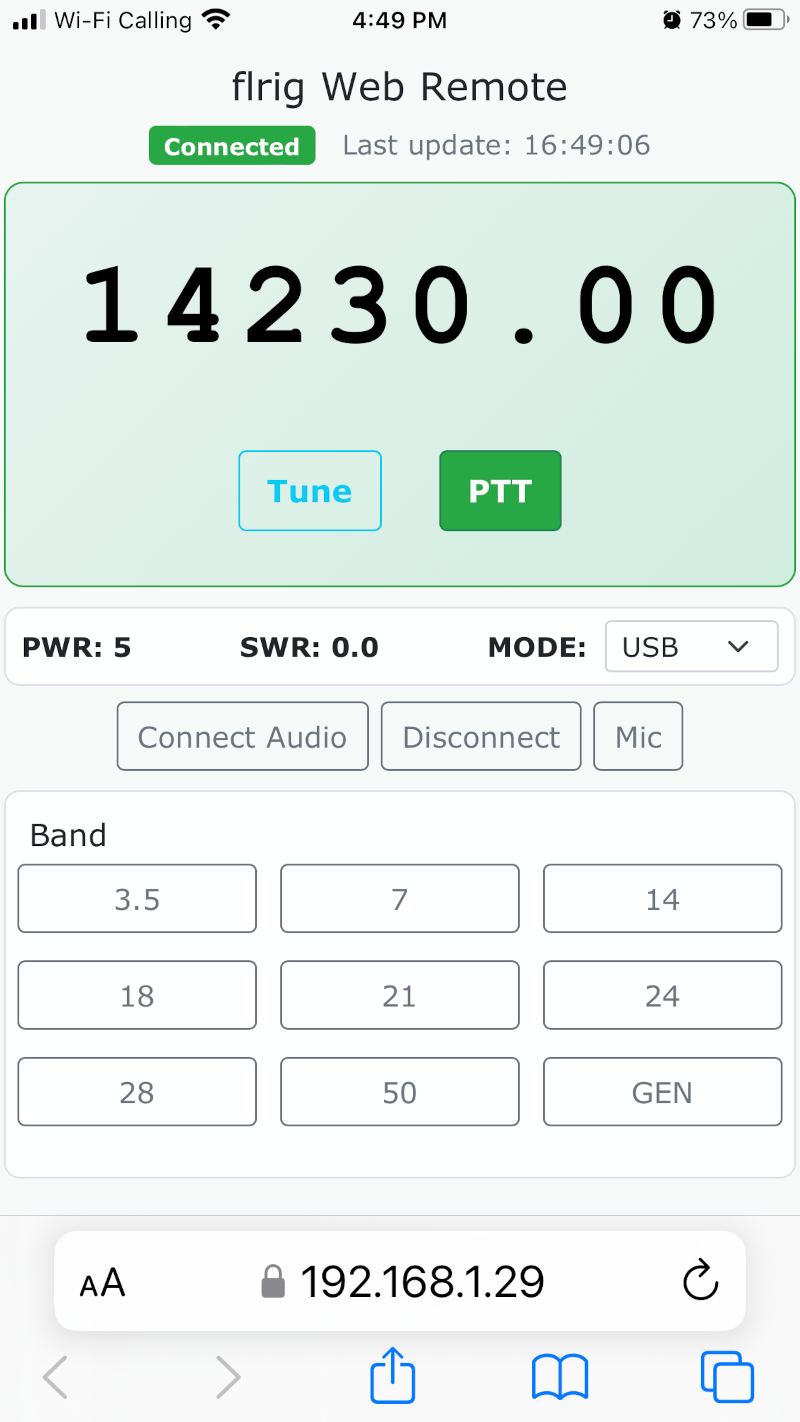
This web app is written in #python and #javascript, with the GUI elements defined in html and css. The python app interacts with flrig’s XML-RPC API. This is the same way that #HamLib and fldigi do what they do, when they’re configured to control the radio using flrig.
The python script also handles connecting to and capturing audio from the USB alsa device, i.e. the “sound card” that the FTdx3000 presents to the Linux computer when it’s plugged in via USB. This is done at an intentionally low SAMPLE_RATE of 24000. It’s voice-only – it doesn’t benefit from a larger sample rate.
The “Connect Audio” button prompts a #WebRTC offer using #Opus and #ICE somehow or another (don’t ask, this was all blocks of code found from suggestions elsewhere).
My TX audio was most recently done from HT over a 2meter simplex frequency to the radio that usually runs my APRS iGate node, a TYT MD-9600. That radio is always in here, and I merely need to shut off Direwolf and YAAC, then move the speaker plug from #RIGBlaster to the HF rig.
So far, I have discovered that I can use this two ways. One is if I remember to enable VOX on the HF rig before I head out back. Then I simply transmit on the HT, and VOX on the HF rig takes care of the rest. But if I forget to enable VOX, I can still transmit by tapping the PTT on the iPhone (or iPad) first, then pressing PTT on the HT. When done talking, release PTT on the HT, and tap the PTT on the screen again to “un-key”. It’s a little clumsy, but not horrible.
Yes, I am of course working on getting the iPhone to capture mic audio and send that as a low-latency stream in the opposite direction, so that the web app does TX audio exactly the same way as fldigi, or WSJT-x, et al. I’ve gotten it to work a little. But it has a sample rate or dropped packet problem. The first transmission is all just rapid clicks. The second is fairly clean voice. The third is cleaner voice, but more latency. By the time I’ve gotten to the 5th transmission or so, the latency is more than a second. It keeps falling further and further behind. I’ll keep working on that, as time permits. But since the crossband thing works quite well, it’s not a high priority. The main goal of more easily (than screenshare apps) controlling the HF radio, AND getting really good RX audio is solved.
Want to pick this up and improve on it in some way? Taylor it to your use and needs? Feel free!
https://github.com/kelvin0mql/flrigWebRemote
Edit: Now With TX Audio
I made a branch, and worked a few hours on getting it optimized to work on MacOS Sonoma, to see if that would help me reduce the audio glitches, and even get TX audio to work better. And it worked!
https://github.com/kelvin0mql/flrigWebRemote/tree/MacOS_Sonoma
In my case, the Line Out from the FTdx3000 goes to my Behringer USB mixer, so the Mac gets that audio via that USB “sound card”. Then the output audio from the Mac (routed from the TX Mic side of the web app) goes to the Mac’s “headphones”, which has the other end of the cable from the rig’s “Line In”.
